🌈 ESP32-S3 Rainbow: ZX Spectrum Emulator Board! Get it on Crowd Supply →
View All Posts
read
Want to keep up to date with the latest posts and videos? Subscribe to the newsletter
HELP SUPPORT MY WORK: If you're feeling flush then please stop by Patreon Or you can make a one off donation via ko-fi

I’ve been creating ChatGPT plugins and started thinking - wouldn’t it be fun to connect this to a Raspberry Pi and control some hardware? Turns out, it’s very easy to do.

You can watch a video of this article here:

ChatGPT plugins are surprisingly simple. They are just standard Web APIs - no different from any other API you might write or call. My particular plugin is really basic. It has just two endpoints.

One returns a list of lights. The other toggles a light on and off.

I’ve set up my little demo with 5 lights:

  • Kitchen
  • Bedroom
  • Dining table lamp
  • Bathroom
  • Lounge

It’s worth watching the video as it’s pretty cool. We just say to ChatGPT, ā€œlet there be light,ā€ and it switches on all the lights connected to my Raspberry Pi.
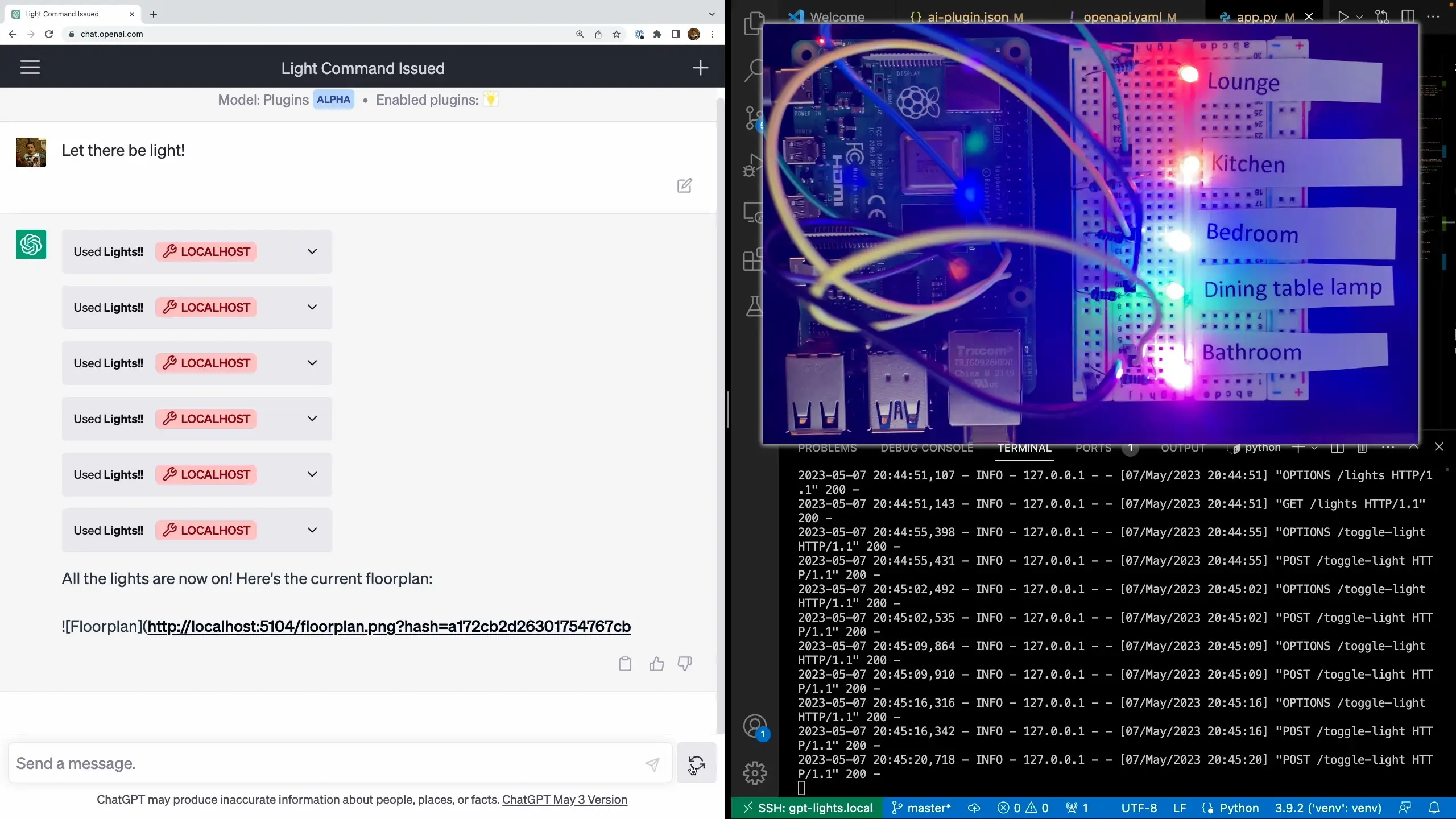
All the lights turn on

What’s really impressive is that the only thing ChatGPT has to work with are a few hints describing the plugin in free text and the OpenAPI yaml file. From that, it figures out that it needs to first get the list of lights, and then it needs to loop through the lights and toggle them on.
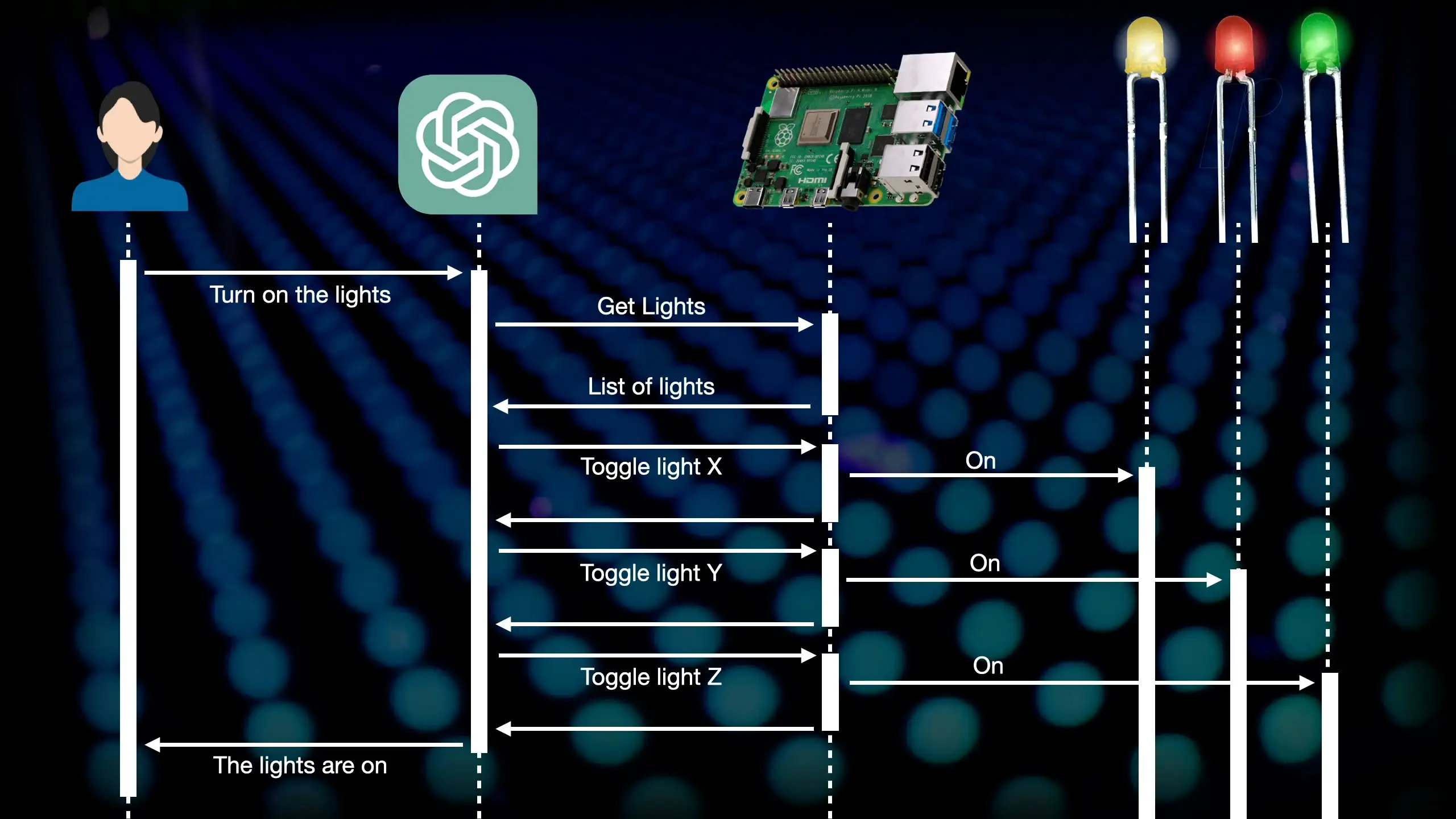
ChatGPT Sequence Diagram

Now, I say ā€œfigured outā€ but I’m not going to claim that it’s thinking or reasoning about the world - that would be a big stretch. But I am going to claim that it’s pretty incredible.

We can even run through a really simple home automation scenario.

  • I’ve just woken up - it turns on the bedroom light
  • Time to shower - it turns on the bathroom light and turns off the bedroom light
  • Time for breakfast - it turns on the kitchen light and turns off the bathroom light
  • I’m off to work - it turns off all the lights
  • I’m back from work with takeout - it turns on the dining table light
  • Time to relax - it turns on the lounge light
  • Time for bed - it turns on the bedroom light

I then tried something a bit different. I pretended to be another device in the bedroom that could detect sounds and told ChatGPT that I could hear snoring. It then turned off the bedroom light and wished me goodnight.

Now obviously, this is a really straightforward demonstration, but to me, the possibilities are quite mind-boggling.

I could see large language models being an interesting way to connect a whole bunch of different systems and services together. There are a ton of poorly designed APIs out there, and integrating them is a nightmare.

Wouldn’t it be funny if we ended up with computers talking to each other using human language instead of APIs?
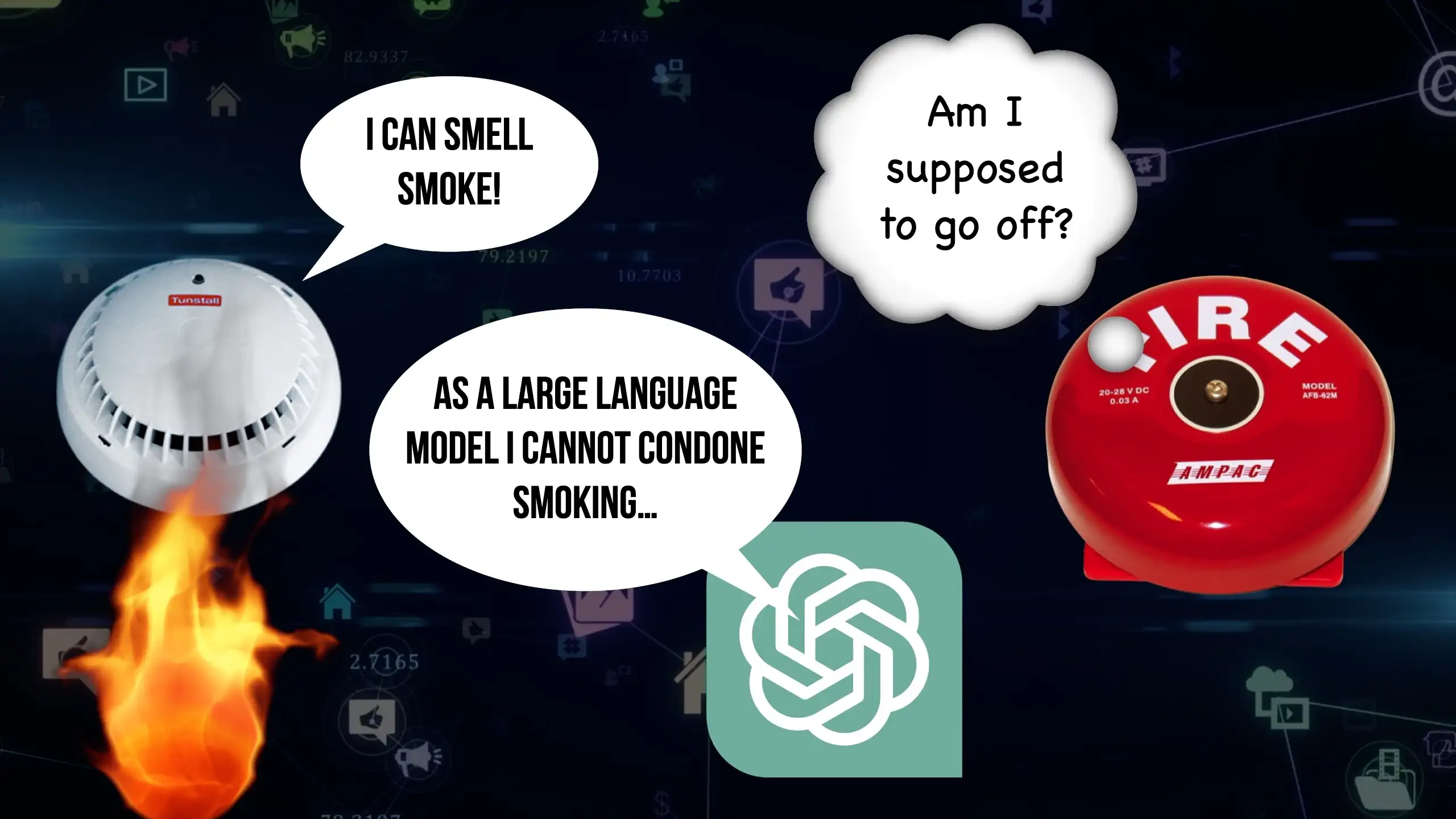
Brave New World

One of the things that I really enjoyed about this project (apart from the fact that it worked!) was that I didn’t have to write much code at all - I was able to get ChatGPT to generate all the code.

This is the prompt I used:

Write me a Python Flask API to run on a Raspberry Pi and control some lights attached to GPIO pins.

I have the following lights:

Kitchen: pin 6
Bedroom: pin 13
Dining table: pin 19
Bathroom: pin 26
Lounge: pin 5

I want the following endpoints:

get lights - returns the list of lights along with their current state
post toggle_light - switches a light on or off

I asked it to make a Flask API - I used this as I’m most familiar with it so I could check what ChatGPT outputs. As always with these Large Language Models, it’s definitely a case of ā€œTrust, but verifyā€.

I told it that it was running on a Raspberry Pi and that there were lights connected to GPIO pins.

And I gave it the list of lights along with the pin numbers.

I then gave it a very vague spec for the endpoints I wanted.

With that basic spec, I was able to get ChatGPT to generate the code for me. I added on a bunch of bells and whistles afterwards, but the core of the API was generated by ChatGPT.

from flask import Flask, request, jsonify
import RPi.GPIO as GPIO

app = Flask(__name__)

# GPIO setup
GPIO.setmode(GPIO.BCM)
GPIO.setwarnings(False)

# Define your lights
lights = {
    "Kitchen": {"pin": 6, "state": GPIO.LOW},
    "Bedroom": {"pin": 13, "state": GPIO.LOW},
    "Dining table": {"pin": 19, "state": GPIO.LOW},
    "Bathroom": {"pin": 26, "state": GPIO.LOW},
    "Lounge": {"pin": 5, "state": GPIO.LOW},
}

# Setup pins
for light in lights.values():
    GPIO.setup(light['pin'], GPIO.OUT)
    GPIO.output(light['pin'], GPIO.LOW)


@app.route('/lights', methods=['GET'])
def get_lights():
    return jsonify(lights)


@app.route('/toggle_light', methods=['POST'])
def toggle_light():
    data = request.get_json()
    light = data.get('light')
    
    if light not in lights:
        return {"error": "Light not found"}, 404

    # Toggle light
    lights[light]['state'] = GPIO.HIGH if lights[light]['state'] == GPIO.LOW else GPIO.LOW
    GPIO.output(lights[light]['pin'], lights[light]['state'])

    return {"success": f"{light} toggled"}, 200


if __name__ == "__main__":
    app.run(host='0.0.0.0', port=5000)

The other thing that is needed for a ChatGPT plugin is an OpenAPI or Swagger file - these are tedious to write - and it has been pointed out to me that if I’d used FastAPI, I wouldn’t have needed to write one at all. But one of the really nice things you can do with ChatGPT is paste in your Flask code, and it will generate an OpenAPI file for you.

I’m just running this plugin locally, I don’t have any plans to publish it as that would require a lot more plumbing. For developing local plugins, you need to have a server running on localhost. Fortunately, we can use the excellent VSCode support for remote development. I’m connecting through to the Pi from my desktop machine, and when I launch the server, VSCode tunnels through to the Raspberry Pi and exposes the server on my local machine.

ChatGPT looks at the /.well-known/ai-plugin.json and uses that to get the name, description, logo, and OpenAPI file. That’s all it has to work with to figure out what to do with the API.

We can get some insight into how it works under the hood. We can just ask ChatGPT to show us its thinking. If we paste in the OpenAPI yaml file and ask it to explain how to turn lights on and off, we get this:
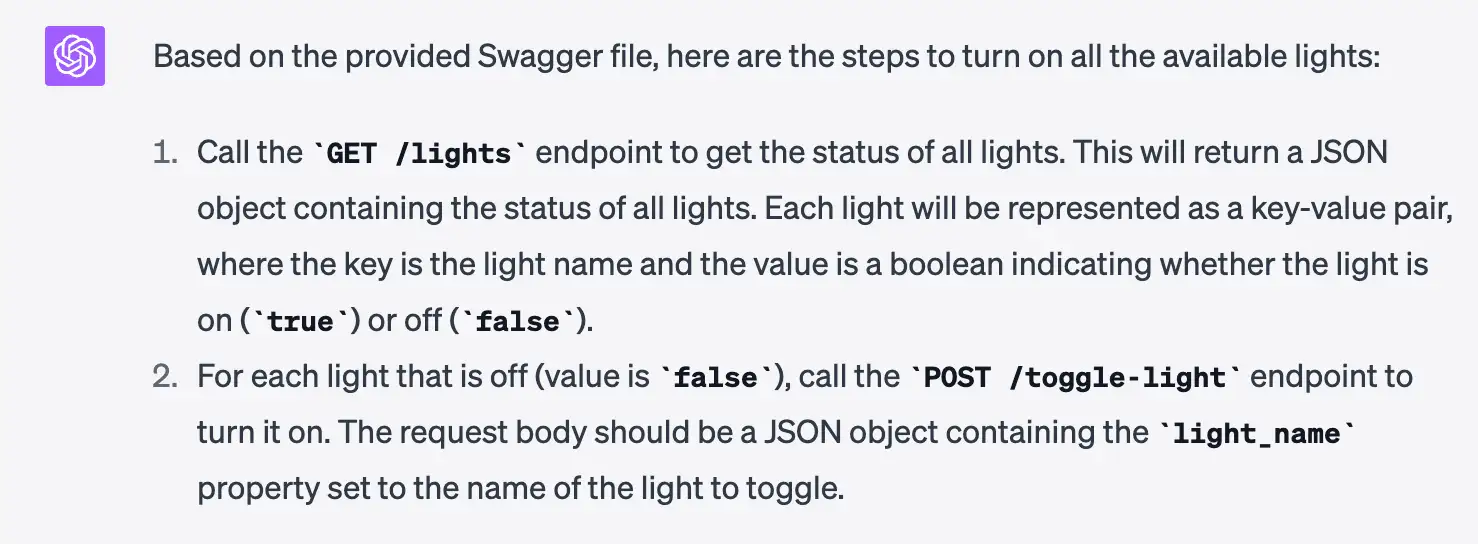
ChatGPT Explain

We can even get it to generate a sequence diagram for us:
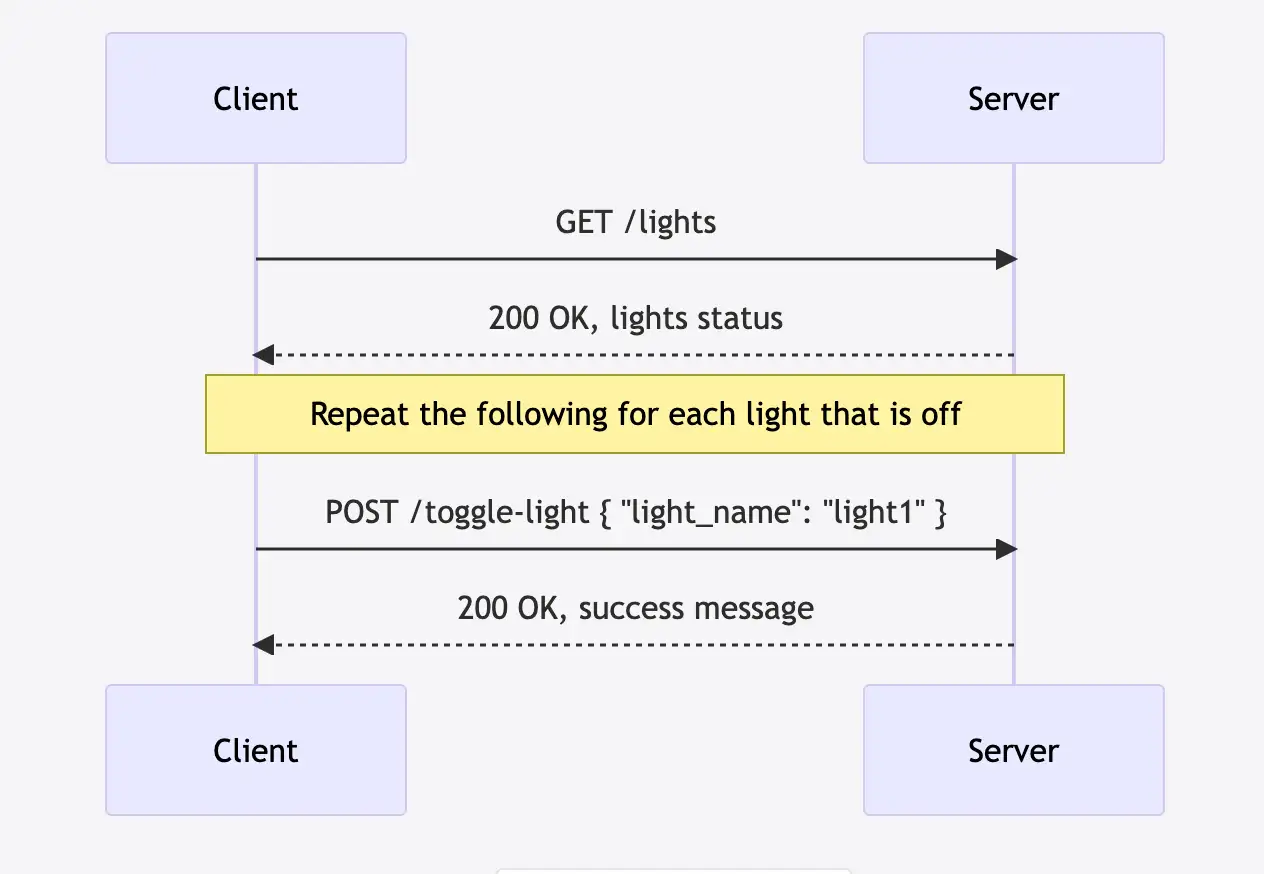
ChatGPT Sequence Diagram

It’s pretty amazing. Now go and watch the video:

Related Posts

I was wrong - we've not reached peak ChatGPT hype yet... - Strap yourselves in, folks, we're in for a wild ride! ChatGPT's new API has reignited my excitement for Large Language Models, just like the start of the dot com boom. With the pricing now 10 times cheaper, a flurry of creative and previously unthinkable use cases is within our grasp. Despite earlier doubts, I now believe we're scaling the peak of inflated expectations. Can't wait to see the innovative applications that will spring from this!
Do you need a ChatGPT plugin? - We've seen two major shifts in technology trends with websites and mobile apps - now there's a third one rearing its head. OpenAI's ChatGPT with plugins is on the cards and you better be ready for it. In the midst of fumbling for answers to whether we need these plugins or not, let me reassure you that it's not too complex. Far from requiring a squad of specialist developers, all you need to know is how to make an API to create a plugin for ChatGPT. Yes, there are potential pitfalls around security and data protection, but with the right precautions, you will be fine. So, dear developer, explore, experiment and gear up for this exciting phase!
Raspberry Pi BTLE Device - Just wrapped up the first iOSCon hackathon and had a blast tinkering with my Raspberry Pi, turning it into a full-fledged Bluetooth device in sync with an iPhone app. Used node for setting up and Bleno for creating Bluetooth low energy peripherals. Penned down each step for you to replicate, right from writing strings on my LCD to reading temperatures and getting notified of IR remote button clicks. Ran it on an app store or GitHub test application. Also, explored the Core Bluetooth framework for iOS app creation, for reading and writing data to the Raspberry Pi. Let's keep creating magic with technology!
Using ChatGPT As a Co-Founder - In the quest to explore the capabilities of ChatGPT, I decided to utilized it as a startup brainstorming partner. From product description to building the product on AWS and GCP, crafting an elevator pitch, highlighting the ideal customer profile, sketching a business plan, and even generating a logo idea, ChatGPT has been surprisingly helpful and creative. We even explored potential team structures that can bring the business to life! Turns out, ChatGPT might just be the co-founder you never thought you needed.
Hue Light Hack - In a fun-filled deep dive into a Philip's Hue Color light bulb, I disassembled, analyzed, and ultimately restored it to working order. Over the course of the hack, I dismantled the bulb’s interior, from the aluminum PCB to the tiny ICs on the logic board, gave a detailed breakdown of their functions and even reverse engineered the signals controlling the colors. Most of the colors worked out pretty well, except for the dodgy yellow. Also, I tried running the hacked bulb setup with my old Moonlamp project. It was a great challenge and an exciting journey!

Related Videos

AI Powered Raspberry Pi Home Automation - Is this the future? - Witness the power of ChatGPT controlling home automation lights through a Raspberry Pi, making life easier with plugins. Delve into the fascinating world of large language models, redefining interactions with APIs.
Unlocking the Power of ChatGPT: Effortlessly Generate Arduino Code for Your Projects! - Witness ChatGPT's impressive potential for generating working Arduino code, as demonstrated in a step-by-step ESP32-based project utilizing a potentiometer and dot star LED.
Most Interesting Addressable LEDs that I've Ever Seen - So, I got this nifty 2x2 meter 400 LED curtain and immediately went to work dismantling it. The LED strands are tapped off the main wire, rather than daisy-chained, which is a departure from the norm. Turns out, these LEDs are pre-programmed, allowing them to intelligently latch onto the right serial data. Unraveling the control unit, we see an IR receiver and other key components responsible for driving the LED strings. Despite my misgivings about deciphering in-built Bluetooth characteristics, I hooked the circuit back up with our dependable WLED software and got some amazing grid patterns. Interestingly, the LEDs operated smoothly at 3.3V. All in all, a fun exploration of hacking this LED curtain.
Live GPIO Viewer - In my latest discovery, I found an incredibly efficient visualization tool from the last outpost workshop that upgrades how I check the status of the GPIO pins on my ESP32. It's super simple to use and allows me to monitor pin activities directly. I set up a couple of LEDs and a button on various GPIO pins to demonstrate its effectiveness and the results were fantastic. Although it currently supports only digital input and output and PWM, I'm optimistic it will expand with time. Thanks to the open-source community, you can find the setup instructions in a GitHub repo. This tool is a revelation and I highly recommend it.
ESP32 - 40 Independent touch pins! - Wow! I'm absolutely thrilled with the results of this video - I've been experimenting with my ESP 320x Spectrum board and its touch Matrix keyboard. Had a bit of trouble with combined button inputs, so I took a deep dive into how touch works and discovered these old, but gold, ICs. After some testing, they turned out to be a perfect solution to my multiplexing problem! I then got a new board design shipped from PCB way - looks awesome and it didn't break the bank. Can't believe how responsive the keyboard is! Got the 'Hello World' program up and running, and even played Manic Miner. The final board's all set - can't wait to get this on sale! And keep watching because I've got some interesting plans for this expansion port!
HELP SUPPORT MY WORK: If you're feeling flush then please stop by Patreon Or you can make a one off donation via ko-fi
Want to keep up to date with the latest posts and videos? Subscribe to the newsletter
Blog Logo

Chris Greening


Published

> Image

atomic14

A collection of slightly mad projects, instructive/educational videos, and generally interesting stuff. Building projects around the Arduino and ESP32 platforms - we'll be exploring AI, Computer Vision, Audio, 3D Printing - it may get a bit eclectic...

View All Posts