Long time no post - I’ve been in the lucky position of having too much paid work, so my own projects have had to be put to one side.
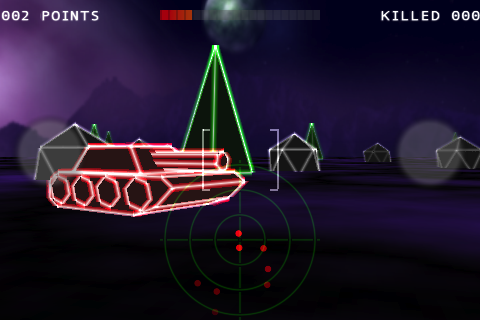
However, I have had time to write and release a new game. “Tanks!” is now available for the Palm Pre/Pixie - you can get it by clicking here:

It should also be available as “Tanks! Mayhem” on the iPhone,iTouch and iPad devices in a week or two once Apple have finished the review process (it’s getting harder and harder to find a free name on Apple app store - hence tacking on the Mayhem to the name).
Originally I was only intending to release the game on the iPhone and only really started it as I wanted to learn OpenGLES 2.0 and needed something to do that on. I find it impossible to just learn something without having an end goal.
The game does work on older phones though, it will fall back onto OpenGLES 1.0 for the rendering - this doesn’t look as nice as the 2.0 version, but it’s acceptable.
I was about half way through development when got my hands on a Palm Pre Plus and the Palm PDK (PDK - Plug-In Development Kit). The PDK lets you write applications in C/C++ and one of it’s objectives is: “Easy porting of C/C++ applications to webOS, especially games that use SDL or OpenGL ES (1.1 or 2.0) for 3D graphics”.
Of course I was writing for iOS so the code I had was in Objective-C. You can easily write iOS code in C++ and you can also mix the two languages and have Objective-C++. However, I normally just stick to straight objective-C when writing iOS apps as you’re normally doing a lot of UI work and all of the API is objective-C. This is a lot less true with OpenGL based games as the API is straightforward C, but I’ve actually come to quite like Objective-C now so I’d started out writing in that language.
All that said, I now had a free phone and I’d committed to getting an app built for it by the end of September, so I bit the bullet and rewrote the core game engine and rendering components in C++. Thankfully the old knowledge all came back pretty quickly and it was surprisingly painless - though I wouldn’t like to show the code to anyone I used to work with…
It was fairly painless to get the game running on both the iPhone and the Palm devices. OpenGL games are fairly simple beasts, you generally have the following structure:
- Set up the OpenGL system - this is normally specific to whatever platform you are developing for
- Read any user input - this is specific to the platform
- Update game state - generic
- Render frame
- Display the rendered frame - specific to the platform
- goto 2
Steps 3 and 4 are mostly completely generic and the same whatever platform you are coding for these two steps were ported to C++ and used on both platforms (I did need some #defines to cope with different include paths, but nothing too painful).
For areas that needed to be platform specific I either used a pure virtual base class and had specific implementations for each platform or for bits that needed objective-C I used a .mm file (objective-C++) for the iOS code and a .cpp file for the Palm code. Other places I just used a simple #ifdef PALM_BUILD and added that define to the my Palm build command.
Steps 1,2 and 5 are quite different. Palm uses SDL - Simple Directmedia Library for these areas. This is a nice simple framework - setting up OpenGL only takes a couple of lines of code and step 5 is just one line of code. On the iPhone this is fairly complex (though the project templates come with everything you need).
Step 2 is completely different on both platforms. Palm use SDL to wrap touches to the screen (touches map onto the SDL_MouseButton and SDL_MouseMotionEvent structures). iOS uses UITouch objects and has methods for touches begin, moved and ended. You can abstract away from this in your game engine, but it does require a bit of thinking.
If you have a game engine that does not rely on anything platform specific and is written in C++ or C then it should be fairly easy to get running on multiple platforms. I’ll now try and compare developing on the two platforms and try and highlight any issues or pitfalls.
Development
For iPhone development we’ve got the xCode IDE this has improved a lot from the version that was available with the first iPhone SDK. One great feature is that they are now using LLVM as the front end for the compiler. This lets you do static analysis of your code to find error and memory leaks - very handy in a reference counting environment. The IDE is nicely integrated with the build system which makes compiling and fixing errors nice and simple.
The Palm PDK doesn’t come with an IDE or any plugins for the common IDEs (unfortunately customising xCode to use different compilers is incredibly difficult to do). I’m sure it should be possible to customise the Eclipse C++ plugin to use the Palm gcc arm compiler and tools but I didn’t investigate this myself and couldn’t find anything obvious on the web. In the end you have to go down to the command line and use MakeFiles. If you know what you’re doing this is pretty painless, if you’ve never used a MakeFile before then this will initially be your idea of hell.
You can use xCode for Palm development to run against the Palm simulator - but as far as I can tell you ‘d need to keep the xCode project in sync with whatever you were using to build the app for the device. I didn’t bother with the Palm simulator as I figured the iPhone device and iPhone simulator would give me just as much information on how the app would run on the Palm device as its own simulator.
In the end lack of an IDE didn’t effect me too much, I was developing for the iPhone at the same time so all my editing was done in xCode and I’d occasionally do a build for the Palm device as a sanity check. It did make the Palm specific areas a bit more painful to develop though - you need to run the make command, see what errors the compiler throws up and then go back to xCode and jump to the appropriate line etc…
In conclusion I’d probably award this area to Apple - if anyone has some good ideas for IDEs for Palm PDK development then let me know.
Deploying to the device
This is a difficult area to judge - once you’ve got the Apple process sussed out then getting your application running on a device is simply a case of hitting build and run. I would say if you are starting out though there are a number of hoops to jump through, you need to get various certificates installed, setup provisioning profiles etc… It’s pretty complicated. Getting the application installed on the palm was simply a case of running a command on terminal to copy the app and supporting files over the usb cable to the device.
I think on the whole I’d have to award this to Palm, the Apple way has far too many points of failure and the number of posts I’ve seen on forums where people simply can’t deploy to their device is just too many.
Debugging
Debugging iPhone apps on both the device and simulator is done using xCode with it’s gui front end to gdb (I’m sure most people don’t even know or care that gdb is what’s working under the hood).
As far as I know the only way to do on device debugging with the Palm is ssh onto the device and run gdb on the command line. I didn’t try this. My Palm debugging mostly consisted of the proper old school technique of adding strategic printfs throughout the code.
I’ll have to award this to Apple. On device debugging in a nice IDE is priceless.
Packaging
Once you’ve got a working app you need to package it up - you can’t simply send Apple or Palm an email with your exe attached and let them get on with it.
Once again, the Apple process when it works and you know what you are doing it pretty painless, but the forums attest to just how easy it is to screw it up and have no idea why it’s not working. You need to create a provisioning profile for distribution, download and install it on xCode, create a new build configuration for distribution and update the code signing rules (which may or may not work depending on how xCode is feeling). All in all it’s too easy to make mistakes and spend a day banging your head again the desk.
For the palm you need to create a directory with all the files you want to package up, an icon and an appinfo.json which is a 10 line file describing your app. There’s then a command line app that creates a package for you to upload to Palm.
This one definitely goes to Palm. For Apple there’s too many ways you can screw it up.
App Submission
You’ve got your final app all nicely packaged up. You’re ready to ship - hooray! Now’s the time to crack open the champagne and invite all your friends over….. In the real world, you are now entering a bit of a mysterious place… app submission processes tend to be a bit of black box. You put your app in one end, and then if you’re lucky it comes out the other end on the app store.
Both Palm and Apple have a similar submission process, you fill out the app information, upload screen shots, set your pricing etc… Apple have changed their process slightly, you used to upload the application via the web, they’ve now integrated this process into xCode or you can use a seperate Application Loader app. Provided you have got the packaging section right and everything is signed correctly then mostly this all works ok - though when it goes wrong it does tend to be a bit of nightmare.
Can’t really pick a winner both submission processes are pretty similar. One annoyance with the Palm process is you can’t put landscape screenshots up - so all my screenshots are on their sides.
Another oddity with Palm is that it’s very hard to self reject your own application and upload a new version. It shouldn’t happen as we all test our apps very carefully before uploading. But it always seems that the minute after you’ve uploaded an application you find a major bug and have to re-upload a new version. With apple you just reject the binary and upload a new one. With Palm there’s a manual process which required someone on Palm’s side to accept your rejection request. Once they’ve done that then you can upload your new version.
Review process
Reading the Palm forums I see pretty much the same complaints I see on the Apple forums about the process being opaque, not knowing what’s happening etc…
Both Apple and Palm employ some automatic scanning to check for private APIs - a nice thing with Palms automatic scanner is that it tells you almost immediately if your app has a problem. Apple you have to wait for a reviewer to reject you - which can take a week or more.
I think on balance I’d probably go with Palm as they seem to be slightly more human, they also don’t seem to have the same level of arbitrary rejections and I’ve not heard of anyone going into review limbo. They also seem to review apps a lot quicker than Apple.
Ad-hoc deployment/beta testing
I wanted to test my built app on a Pixie as I know it’s got a slower lower power CPU and GPU along with a smaller screen. Fortunately I was able to find someone with a Pixie (thanks Jason from Anaya Gaming!) and send him the packaged up Palm app to test. With an iOS app I would have had to get his device id, add it to my developer account and provisioning profile (which would use up 1 of my 100 device slots for the year) then send him a build along with the provisioning file. Once again this normally works, but when it doesn’t it’s a nightmare…
Palm also have a beta testing area where you can upload your apps and then give the URL out to friendly users. Very handy.
I’ll have to award this area to Palm.
Notable API differences
As I’ve noted already the UI interaction area is completely different. Another area that was annoyingly different is Audio. iOS has OpenAL for doing gaming audio. This is a powerful audio library that gives you positional audio along with lots of other effects. Palm comes as standard with SDL_Audio and SDL_Mixer - these are also quite usable but a bit limited. Fortunately you can compile OpenAL soft (thanks again Jason) and have it talk to SDL as it’s back end. The rumour is that future versions of WebOS will come with OpenAL as standard which will be great.
Summary and Conclusion
I wasn’t really intending to write quite so much, especially not on a pub night, so I’d better conclude here. All in all it was quite an enjoyable experience porting the app across. It’s pleasing to be able to use skills that have gone a bit rusty (getting back to the command line and using MakeFiles was great). If you’ve got game code that is based around OpenGL and is written in C++ or C then there aren’t really any serious barriers to porting the code from iOS to the Palm PDK. Areas where you’ll have difficulty are UI interaction and audio.
I would say though that if you have a lot of UIKit code in your iOS project you will have a bit of a mission. There’s no easy way to bring that code and UI over to the PDK - also, you currently can’t build hybrid apps, so everything has to be in SDL or OpenGL.
In total if I put all the time I’d spent developing and building the game together into one lump I think there’s about 2-3 weeks of work in it. I think adding the Palm platform if you exclude the cost of porting my existing code to C++ added a few hours here and there, but nothing significant. Next up Android!
Here’s how the game ended up on the Palm (this is version 1.0.4 which is waiting for approval right now). Apologies for the poor video quality:
<center>
<object width="425" height="344"><param name="movie" value="http://www.youtube.com/v/bf7Ert1wkg4?fs=1&hl=en_US"></param><param name="allowFullScreen" value="true"></param><param name="allowscriptaccess" value="always"></param><embed src="http://www.youtube.com/v/bf7Ert1wkg4?fs=1&hl=en_US" type="application/x-shockwave-flash" allowscriptaccess="always" allowfullscreen="true" width="425" height="344"></embed></object>
</center>
And here’s an iPhone screenshot:
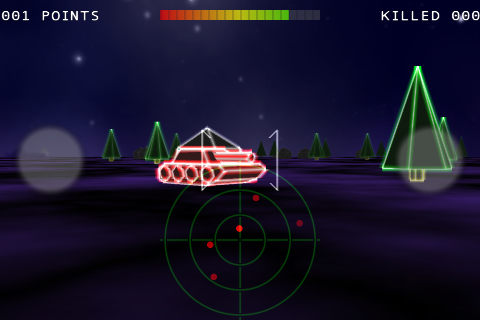
And a Palm Pre Plus screenshot: