In November 2006 I put everything I owned in my parents’ loft, had a great many injections, and flew to Guatemala. I came back thirteen months later having crossed fourteen countries between Antigua and Tierra del Fuego, and I’d written the whole thing up as it happened — 182 posts typed into internet cafés, hostel lobbies and the occasional boat.
That blog is still at travellingchris.blogspot.com. Most of the photos are still on Flickr. Both the blogging service and Flickr still work, but Flickr is now a paid service with limits. And Blogspot is now blogger (or is it the other way round?). Flickr has changed hands three times and now charges for more than 1000 photos.
So I took exports from both and fed them into Claude: “Rebuild my old blog as a static site - here’s the blog export and here’s a bunch of photos”. And this is what I now have: travellingchris.atomic14.com.
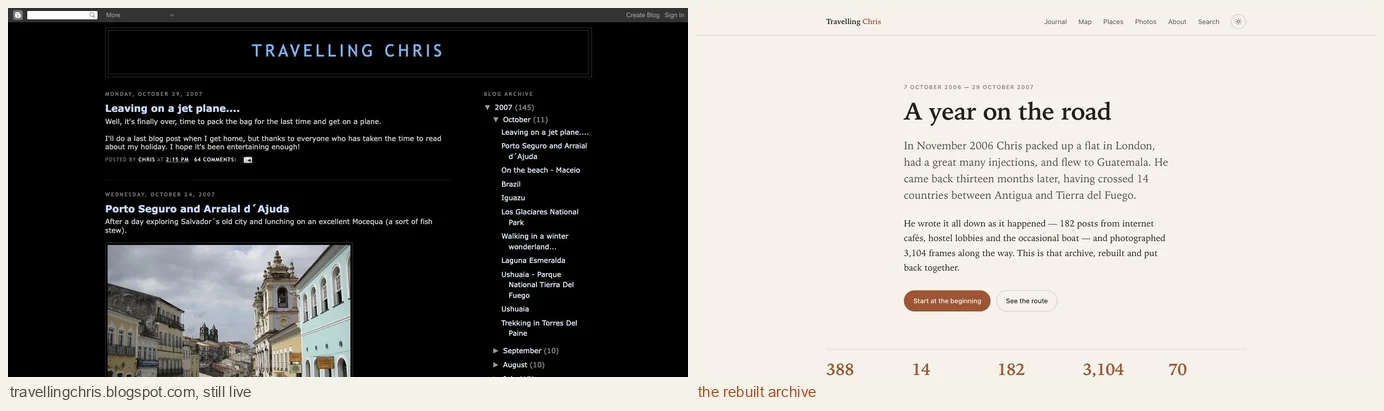
The tech itself is pretty boring — Astro, static HTML, photos on Cloudflare R2 - it should run for next to nothing. There were some interesting things along the way.
Two archives to reconcile and fix
Google Takeout gave me an Atom feed with 942 entries in it: 182 posts, 203 real comments, and 557 spam comments accumulated over the last couple of decades. Flickr gave me back my 2,819 photos with some JSON metadata.
The two kind of match up, although I didn’t start uploading to Flickr until half way through the trip.
- Flickr covers April 2007 onwards — South America — with capture dates and some tags.
- The Blog photos covers November 2006 to March 2007 — Central America. Sadly, for that half of the trip, that’s all I have. And they are quite low resolution. I’m hoping somewhere I have a backup - but I haven’t found it yet.
Missing photos
Tracking down the photos for every posts was a bit of a mission. In all there are 182 posts with 778 images in them.
Some of these turned out to be photos hotlinked from other places. These are pretty much gone forever.
Some of the earliest posts reference photos1.blogger.com, the image host Blogger used in 2006. Google
Takeout didn’t include those files. But the host is still up and serving files
nineteen years on. Claude wrote a script and pulled thirteen
photographs back out of it - so those photos are saved! Though again, quite low resolution.
Dodgy HTML
A fair number of the posts were broken in various ways - for example we’ve got things like this:
<img src="http://farm3.static.flickr.com/2229/1518290776_54f431e902.jpg?v=0<br />
Claude is pretty good at this kind of things though and fell back to just finding things that looked like URLs.
After all this, we managed to get 766 photos out of the 778 image references. That’s not bad for something that’s been rotting away for 19 years.
Fixing the overlap
The two archives overlap between April and June 2007, when I sometimes uploaded the same photo on the blog and on Flickr. Those images were then resized by each service and have different filename - so we end up with dupiclates.
Claude’s initial attempt to fix this was a bit naive and didn’t work well.
The problem is, the collection is full of similar pictures. Waterfalls and ancient ruins can look almost like each other and there’s quite a few “burst” shots. Here are three pairs my first pass happily merged:
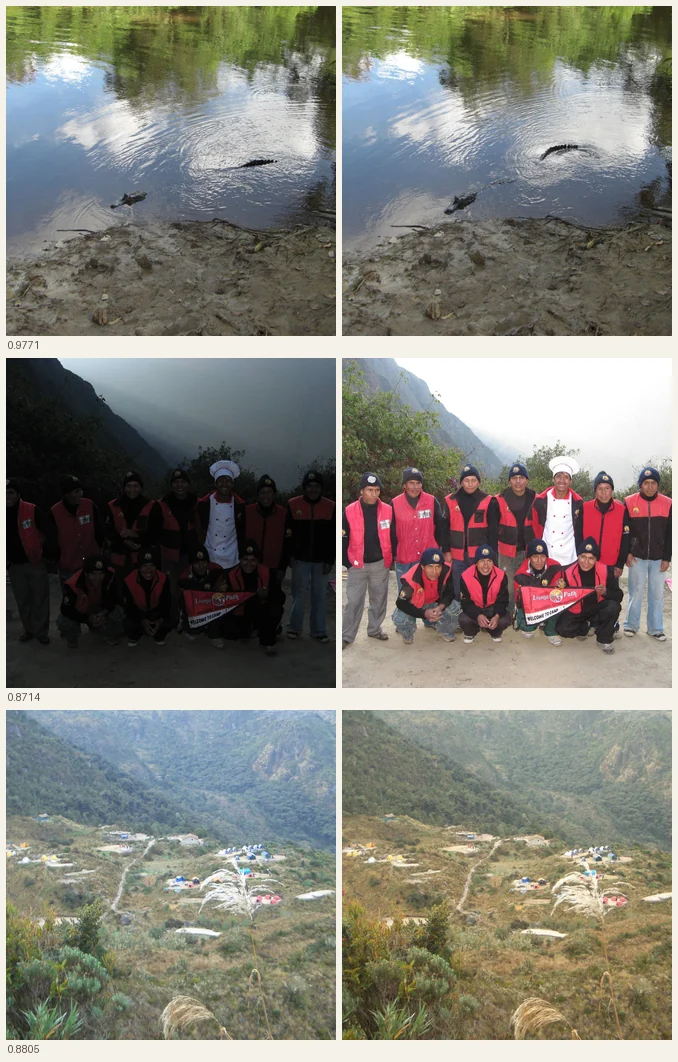
So Claude tried something else: cosine similarity between mean-subtracted 32×32 greyscale thumbnails. 1,024 dimensions instead of 64 bits, and blind to brightness and contrast. The numbers separate beautifully on this collection:
| score | |
|---|---|
| Burst frames (must not merge) | ≤ 0.9793 |
| Genuine re-encodes (must merge) | ≥ 0.9993 |
That worked pretty well and we didn’t lose any photos.
All the dates are wrong
None of the 2,819 Flickr photos has a geotag. These were all taken before good mobile cameras were ubiquitus and I took them on all on a normal camera.
There is no location data anywhere in either export.
But there are 25,000 words of me saying where I was.
So the locations come from the writing. Each post is matched against a the places it mentions - including all my misspellings (my spelling is attrocious).
Photos actually embedded in a post are easy - every post has some kind of location infomation in it. A photo in the Machu Picchu post is Machu Picchu, and it’s dated 1 September 2007. That gives Claude 762 dated anchors scattered across the year. Using that, every remaining photograph can be approximately placed by interpolating its own date against them.
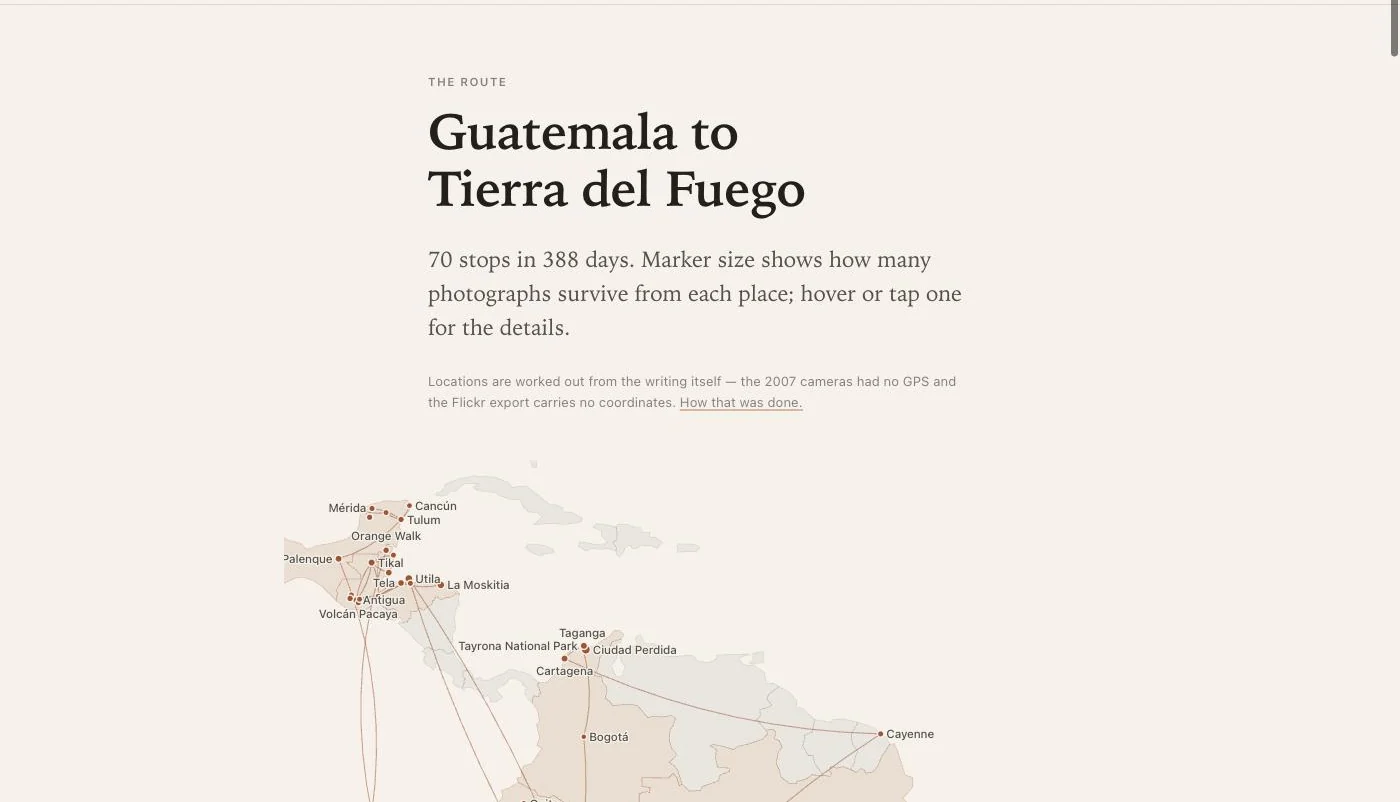
Two things Claude got wrong first time:
Post dates are not photo dates. I blogged from internet cafés days after the fact. “Back from the wilderness” was published a week after the photos in it were taken. Using publish dates as location anchors put a whole trek in the wrong place. A post’s own date has to only be used when it has no dated photos for it.
Upload dates are not capture dates. The Blogger images have no EXIF capture date, so we fell back to upload time — and a set of beach photos from Mexico got placed in New York, because that’s where I was when I uploaded them two days later. Photos published in a post need to take the post’s location directly rather than going via the date timeline.
Every photograph carries a confidence level: 762 certain, 2,220 confident, 119 inferred. It could be better, but it’s good enough. And I’m not going to hand curate 2000+ photos…
There are a lot of beaches - all called beach.jpg…
This one I spotted after Claude has finished - haven’t I seen that beach already on a previous post?
In 2007 I uploaded a photo, called it beach.jpg, and posted it. Three weeks
later I did exactly the same thing. Seven times over seven weeks.
Google Takeout disambiguates the files — beach.jpg, beach(1).jpg, through
beach(6).jpg — but the URL inside each post carries only the original name. So
if you resolve photos by filename, as Claude did, all seven posts get the same
photograph and the other six are orphaned. Thirty-four filenames in the album
collide this way.
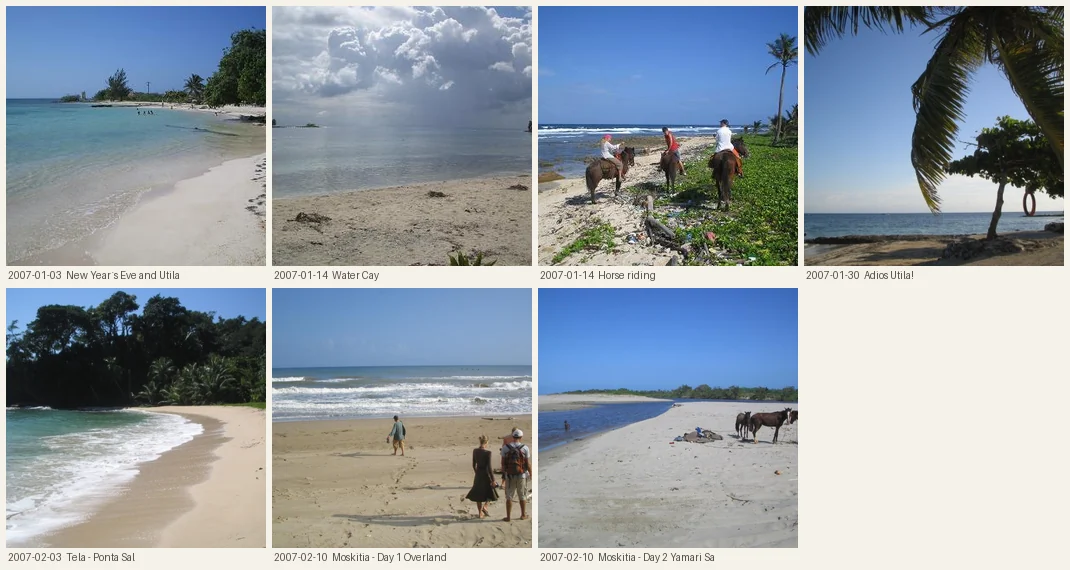
Each photo needed to include its upload date to disambiguate it.
There were a couple of other issues like this, including two photos called garden.jpg.
My london flat did not have a tropical garden…
Fixing both took the number of distinct photographs actually visible in posts from 723 to 762.
More photos!
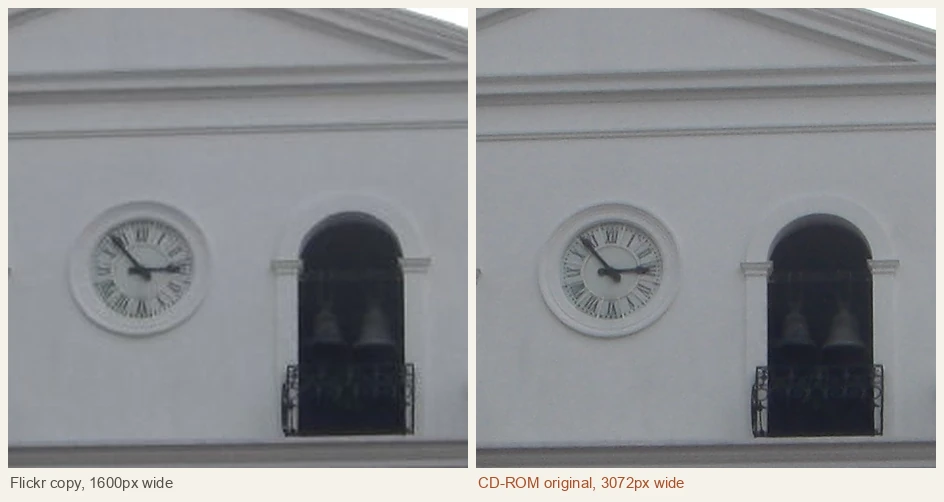
I fond another stash of photos on a CD-ROM I’d burned as backup in June 2007. These were all original photos straight off the camera’s SDCard 3072x2304 and covered April and May. I’m pretty sure that somewhere there’s a nother CD with more photos. But these ones covered Ecuador and the Galápagos.
The obvious question: are these already in the archive, or are they new? By hand that’s 145 photos to match up against 3,073, which is not happening. But Claude had already built a matching tool so it was pretty easy to check.
| Matched something in the archive | 127 photos, all scoring ≥ 0.995 |
| Closest non-match | 0.7537 |
All the 127 matches were photographs that had been uploaded to Flickr as a 1600px copy - and one of them that had survived only as a 640px thumbnail. The remaining 18 were never uploaded anywhere.
Even more photos
I thought I’d lost all the Death Road photos — mountain biking down the Yungas Road. They’d been hotlinked from the tour company’s Flickr account, which no longer exists.
But - some of the photos were on the backup CD-ROM! So there is some record of my madness.
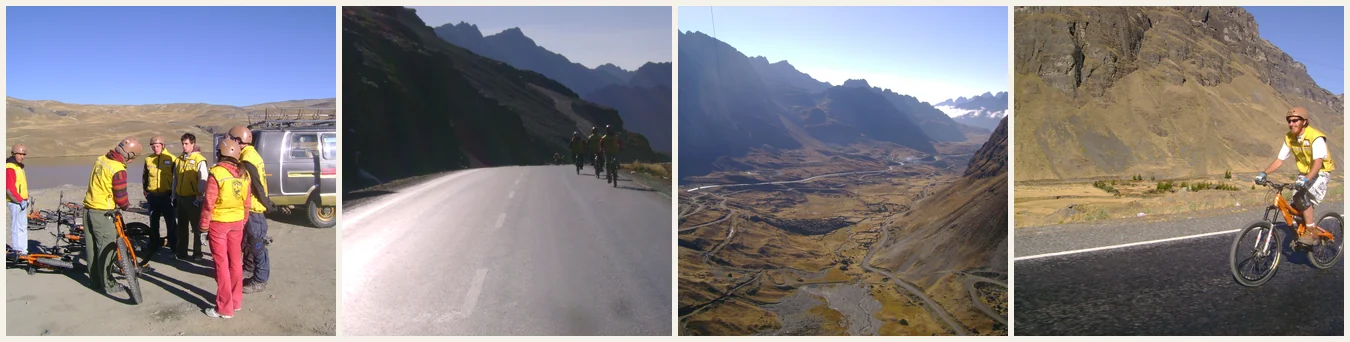
They don’t quite match up to the original photos I’d put in the blog, so Claude decided that we should be honest and put a note in their place:
A photograph stood here. It was hotlinked from an account that no longer exists, and is in neither export. Other photographs from these days did survive — 18 of them are in the gallery.
267 photographs with strange orientations
Some frames in the archive are rotated 90 degrees.
Claudes first attempt was a simple “find the sky and check it is at the top.”
Take a strip off each of the four edges, score each strip for brightness and blueness, and the winning edge should be the top. When it is decisively the left or the right, the frame is on its side.
This didn’t work very well:
| Upright photographs wrongly flagged | 4% |
| Turned photographs caught | 38% |
| …and turned back the right way | 97% |
| No verdict at all | 802 photographs |
Claude tried a bunch of other things: upright scenes carry more horizontal structure than vertical — horizons, walls, tables, waterlines — so a 90 degree turn should swap the balance of edge gradients. It is cited everywhere.
On this collection: 56% accuracy overall, we’d have been better off tossing a coin.
Using some proper machine learning
After a bit of googling, I found this model: check-orientation, a ResNeXt-50 trained on four rotations. Way better results:
| heuristic | model | |
|---|---|---|
| Flagged | 163 | 267 |
| Finds 180° flips | no | yes (8 of them) |
| Works indoors, at night | no | yes |
| Abstains on | 802 | none |
Claude checked the results by looking at the flagged images and every one of the 162 photographs it found was genuinely on its side. It runs on Apple Silicon in about a minute for the whole archive.
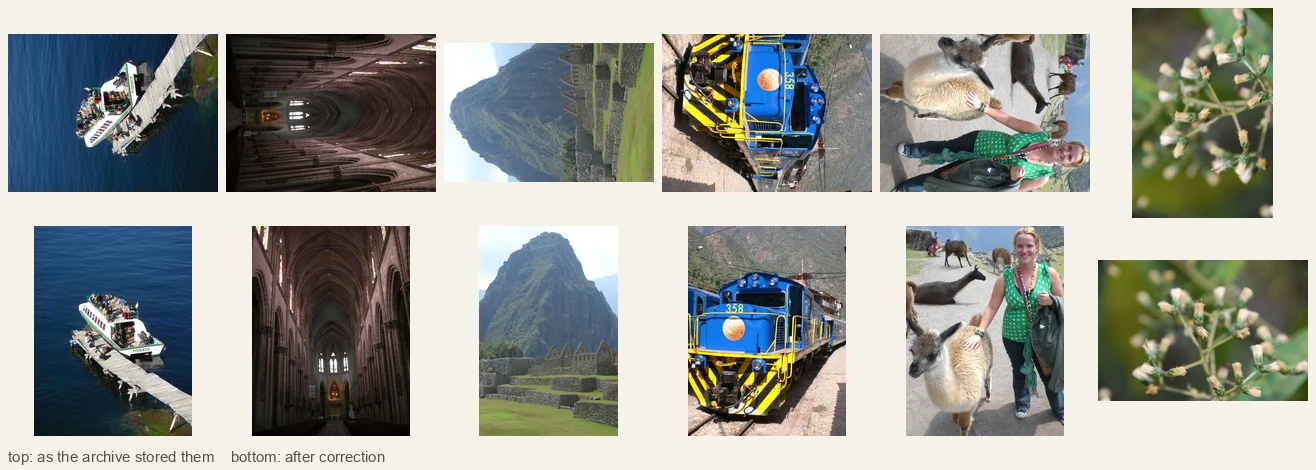
267 photographs, 8.6% of the archive, were lying on their side. Four of the six above are cases the simple sky heuristic could never have caught.
These photos are rubbish…
Next step was to actually do some QA on the site and the first thing I noticed was that there were several places where images were needed to “represent” something: a country, a period of the trip etc.., and the simple “take the first picture in the set” approach didn’t reallty work.
Peru, with 1,612 photographs, was represented by a picture of a passport stamp. Interesting, but not exactly a “hero” shot.

What it costs to run.
The whole thing is static HTML on Cloudflare Pages with 2 GB of photos in R2.
It should cost pennies to serve.
Will it still be live in 19 years time? Maybe I’ll be writing another blog post with whatever the latest AI is about how I rescued my old travelling posts…
Who did all the work?
Claude, obviously. The current crop of LLMs seem to excel at this kind of static site generation and data extraction. My only input was a few idea and a bit of helpful googling.
What a time to be alive!