LilyGo T-Display-S3 AMOLED
Also known as: T-Display-S3 AMOLED · LilyGo AMOLED 1.91
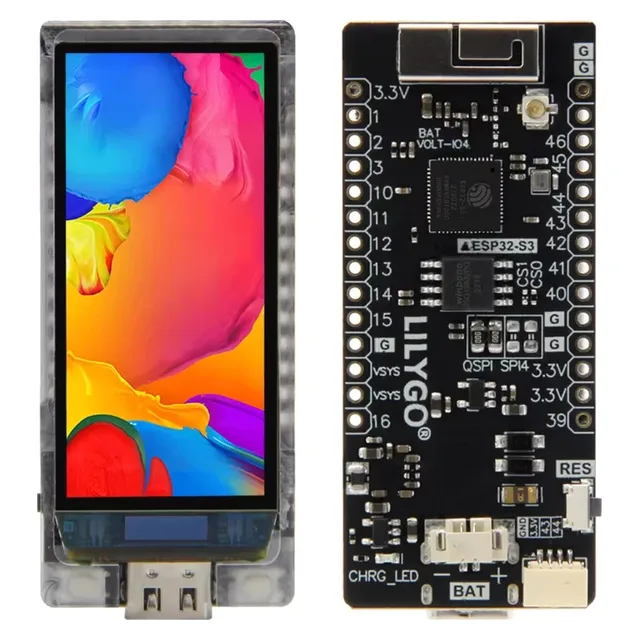
The T-Display-S3's premium sibling: a punchy 240x536 AMOLED strip with true blacks and high contrast, ideal for tickers, gauges and pocket UIs where the wide-format IPS looks washed out.
As an Amazon Associate and an affiliate we may earn from qualifying purchases. Prices and availability are set by the retailer.
At a glance
⚑ flag an error| SoC | ESP32-S3 |
|---|---|
| Vendor | LilyGo |
| Type | Display board |
| Memory | 16 MB flash · 8 MB PSRAM |
| Display | 1.91" 240x536 AMOLED (RM67162, QSPI bus), optional capacitive (touch SKU) touch |
| Connectivity | Wi-Fi, BLE 5 |
| USB | USB-C (native USB) |
| Battery | Yes (onboard LiPo charging) |
| Onboard extras | battery |
| Typical price | $28-35 (street, varies) |
Compare all ESP32 display boards in one table →
Good for
Works with
Firmware and UI-stack support, with a known-good starting point where one exists. "Community" means an unofficial but working config or port.
- ESPHome Community support
- LVGL / Arduino Community support config / port →
Gotchas to know
- QSPI AMOLED means TFT_eSPI is out — use Arduino_GFX or LilyGo's own examples.
- AMOLED burn-in with static elements; rotate content or dim aggressively.
- Touch vs non-touch SKUs (and a Plus revision with more GPIO/Qwiic) get conflated in listings — check which you're buying.
- Usual LilyGo caveats: docs are example dumps, and SKUs cycle in and out of stock.
Variants
Family: AMOLED (1.91"), AMOLED Plus (touch + Qwiic + 18 GPIO), Lite, and the dual-screen DS. The 2.33" T-Display-S3 Pro and 3.4" T-Display-S3 Long are separate boards.
The ESP32-S3 inside
This board is built on the ESP32-S3 . See the SoC page for the full peripheral, GPIO and security details.
Bare modules on the same SoC:
Adding sensors?
Presence radars, climate, CO2, energy — the sensor comparison table covers what people actually wire to these boards, with ESPHome support status and clone-risk ratings per part. Radars want a hardware UART; I2C sensors chain on two pins.
Resources
Community guides usually go deeper than this page: pinout diagrams, wiring, library setup and copy-paste example code from people who build with these boards daily.